ROI and ROAS Tracking for Lead Generation Campaigns (2026 Guide)
Learn how to calculate true ROI and ROAS on your lead gen campaigns. Lead Distro AI's built-in ROI/ROAS columns track cost, revenue, and attribution across all lead and call campaigns.

Rafael Hernandez
Founder & CEO
Ex-Microsoft SWE · $10M+ PPL ad spend
I hope you enjoy reading this blog post. If you want to try Lead Distro AI for free, click here.
Author: Rafael Hernandez | Founder & CEO of Lead Distro AI
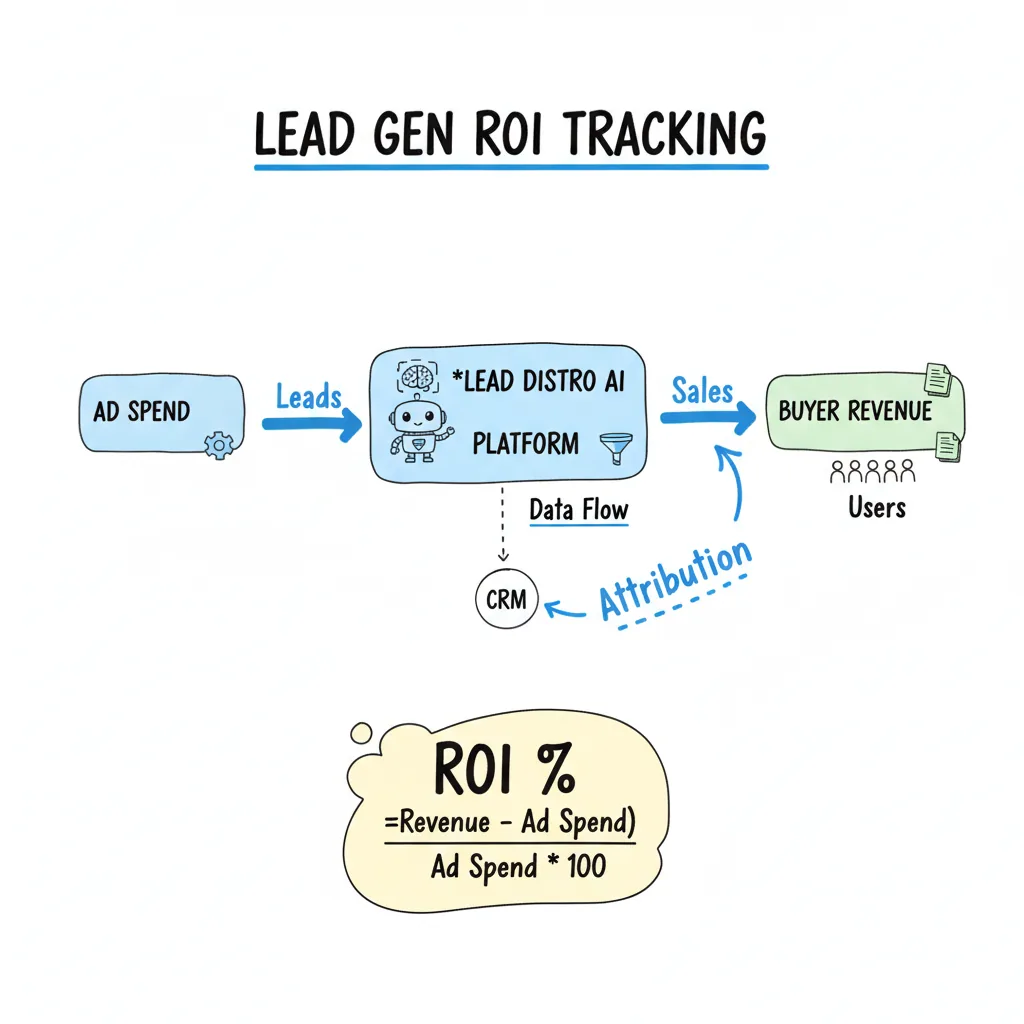
ROI tracking for lead generation measures how much revenue your campaigns produce relative to their total cost, covering both ad spend and platform fees. ROAS (return on ad spend) focuses specifically on what your advertising budget returned. Many pay-per-lead and pay-per-call agencies still track these numbers in spreadsheets. As of August 2026, Lead Distro AI does it in the platform: campaigns now include built-in ROI and ROAS columns you can enable directly from the campaign dashboard under the Financials column picker, for both lead campaigns and call campaigns.
For lead generation agencies, attribution is harder than it looks because costs span multiple layers: the ad account, the platform subscription, and any per-lead fees layered on top. Tracking only one of those inputs produces a number that looks better than reality. This guide explains how ROI and ROAS work for lead gen, where most agencies go wrong, and how Lead Distro AI's native tracking closes the loop without a spreadsheet.
Key Takeaways
- ROI measures total profitability: (Revenue minus total cost) divided by total cost, expressed as a percentage. ROAS measures the return on ad spend alone, not on overall cost.
- Lead Distro AI has native ROI and ROAS columns on both lead and call campaigns, enabled from the Financials section of the column picker (released August 27, 2026).
- Most agencies undercount their true cost by excluding platform fees and ad spend on days with no leads, which overstates profit.
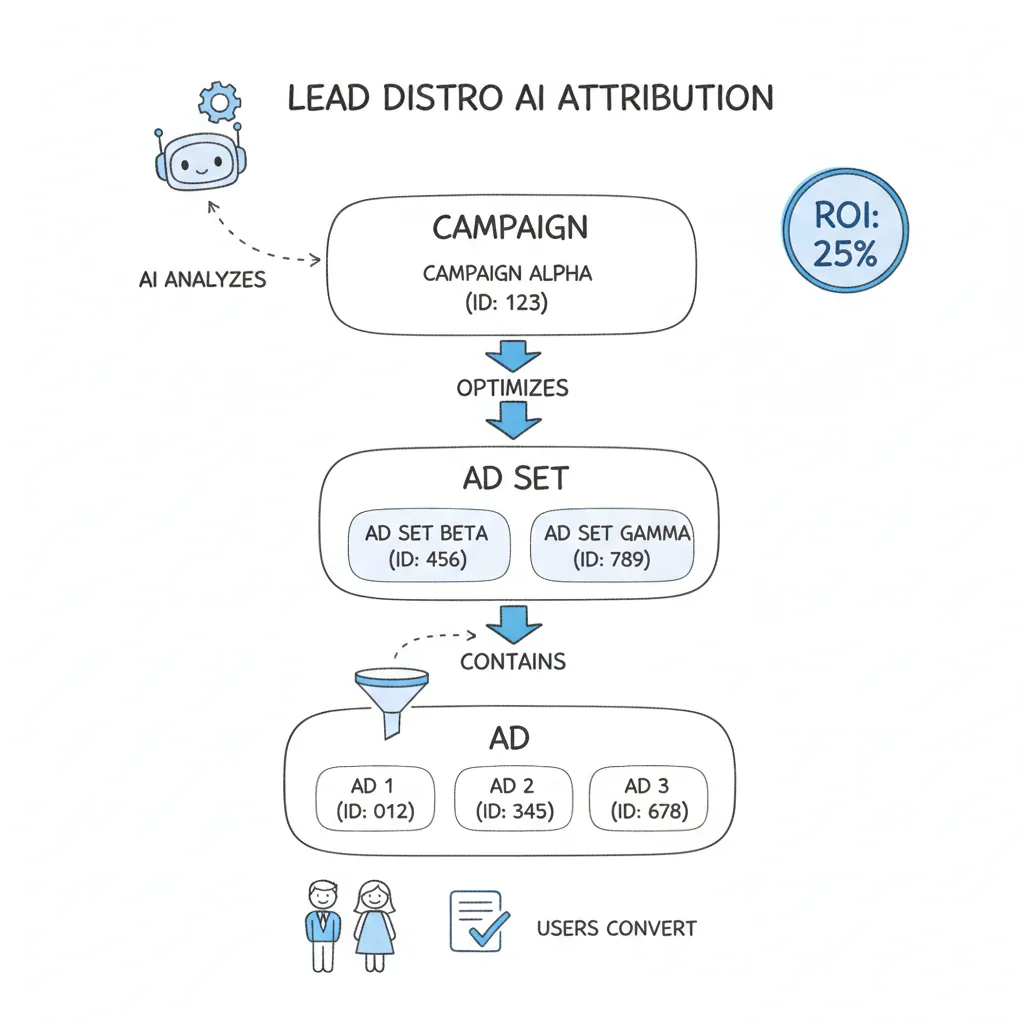
- Accurate attribution requires matching ad IDs to names: the Attribution panel in Lead Distro AI lines up each ad, ad set, and campaign ID next to its readable name so results are clear at a glance.
- Start ROI analysis with total cost, not just ad spend, to get a number that reflects actual campaign economics.
What Is ROI vs ROAS in Lead Generation?
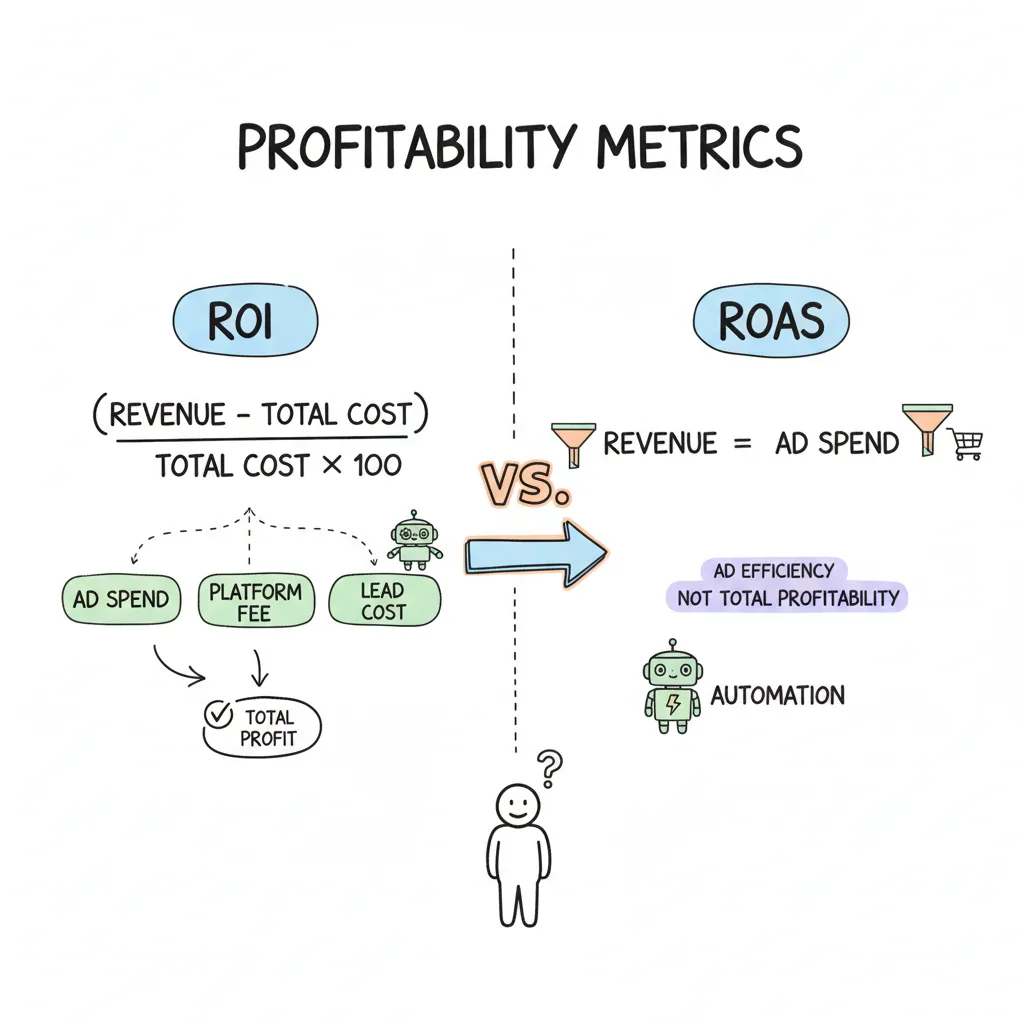
ROI (return on investment) is the standard profitability metric. For a lead gen campaign, the formula is:
ROI = (Revenue from Closed Leads - Total Campaign Cost) / Total Campaign Cost x 100
Total campaign cost includes your ad spend plus your lead distribution platform fee plus any per-lead charges or retainers. Using only ad spend in the denominator overstates the return.
ROAS (return on ad spend) isolates how much revenue each advertising dollar produced:
ROAS = Revenue / Ad Spend
A ROAS of 4 means every $1 in ads returned $4 in revenue. ROAS is useful for comparing ad channels and creative performance, but it is not the same as profitability. A campaign with a 5x ROAS can still lose money if platform and overhead costs are high enough. For pay-per-call campaigns, the same logic applies: revenue is the value of converted calls, and total cost includes call tracking fees, platform subscription, and ad spend combined.
Why Most Agencies Track Lead Gen ROI Wrong
The most common mistake is treating ad spend as the only cost input. A campaign running at $500 per day in Meta ads but earning zero leads on three of those days still incurred $1,500 in spend during that window. If your platform only counts cost on days with lead activity, your cost per lead looks artificially low and your ROI looks artificially high.
A second mistake is misattributing revenue to the wrong campaign because ad IDs in your CRM do not match readable names. When a campaign appears in your attribution data only as a numeric ID, connecting the conversion back to the right creative or audience is guesswork. This is especially common when running multiple ad sets across Meta and Google simultaneously.
A third mistake is calculating ROAS without accounting for lead returns. If a buyer rejects a lead and receives a credit, the revenue on that campaign drops while the cost stays the same. ROAS calculations that ignore returns overstate performance and can push you to scale a campaign that is not actually profitable.
The ad attribution for lead generation guide covers attribution setup in detail for agencies running multi-channel campaigns.
How Lead Distro AI's ROI and ROAS Tracking Works
Lead Distro AI released native ROI and ROAS columns on August 27, 2026, available on both lead campaigns and call campaigns. To enable them, open any campaign, click the column picker, and turn on the ROI and ROAS columns under the Financials section.
The platform calculates these figures using total cost, not ad spend alone. Dashboard Cost includes ad spend on days with zero leads, so the numbers reflect what you actually spent rather than an optimistic subset of active days. Meta ad spend syncs the last 14 days on every run (extended from 3 days) so delayed attribution and any missed sync runs catch up automatically instead of leaving gaps that distort weekly averages.
For attribution clarity, the Attribution panel on each lead now lines up each ad, ad set, and campaign ID next to its readable name, so you can see which creative drove a conversion without copying IDs into Ads Manager. For call campaigns, buyers can request returns directly from their portal. Approving a return reverses the charge so your revenue figures stay accurate without manual edits to the campaign record.
If your CRM already handles lead delivery, you can set a source to Tracking Only mode. Lead Distro AI then tracks cost, attribution, and conversions with no delivery loop, so ROI columns reflect the real economics even when the CRM is the system of record for the lead itself. Explore the full feature set on the Lead Distro AI product tour.
How to Calculate Lead Gen ROI Step by Step
Here is a concrete example for a personal injury pay-per-lead campaign:
Campaign inputs:
- Monthly Meta ad spend: $5,000
- Lead Distro AI platform subscription: $297 (Starter plan)
- Total cost: $5,297
Campaign results:
- Leads delivered: 40
- Leads closed by buyers: 12
- Average value per closed lead: $3,000
- Total revenue: $36,000
Calculations:
- ROI = ($36,000 - $5,297) / $5,297 x 100 = 580%
- ROAS = $36,000 / $5,000 = 7.2x
The ROI figure (580%) is the correct profitability metric for budget planning and client reporting because it accounts for the full cost of running the campaign. The ROAS figure (7.2x) tells you how efficiently your ad dollars converted, but it does not include the platform cost. Both numbers matter: ROI answers "was this campaign profitable enough to scale?" while ROAS answers "which ad set or creative should receive more budget?"
Use the lead pricing calculator to model different cost and conversion scenarios before committing to a campaign budget. For a broader look at platforms that surface ROI natively, see best lead distribution software.
Setting Up ROI Tracking in Lead Distro AI
To get accurate ROI and ROAS columns on your campaigns, follow these steps:
- Connect your ad account. Map your Meta, Google, or Microsoft campaigns to a Lead Distro AI source so ad spend flows into cost automatically.
- Enable the columns. Open the campaign view, click the column picker, and turn on ROI and ROAS under Financials. This works on both lead campaigns and call campaigns.
- Review the Attribution panel. On any lead, the Attribution tab shows the ad, ad set, and campaign that generated it, each listed with its ID and its readable name side by side.
- Check the date range. Meta ad spend syncs the last 14 days, so if you recently fixed a missed cron run, wait one sync cycle before pulling ROI numbers for the corrected period.
- Enable call returns (for pay-per-call campaigns). Turn on the Allow call returns switch per destination so buyers can request returns from their portal, keeping your revenue figures accurate automatically.
If you run campaigns where your CRM handles delivery, set the source to Tracking Only so Lead Distro AI records cost and attribution without a delivery loop. This keeps ROI calculations accurate for campaigns where revenue data flows through your own system.
For agencies running Meta campaigns and needing closed-loop conversion data, the Meta Conversions API guide for lead generation covers how to send conversion events back to Meta so your ad platform's own ROAS numbers match what you see in Lead Distro AI.
FAQ
Does Lead Distro AI have ROI tracking?
Yes. Lead Distro AI has native ROI and ROAS columns on both lead campaigns and call campaigns, released August 27, 2026. Enable them from the Financials section of the column picker in any campaign view. The platform calculates ROI using total cost, including ad spend on days with no leads, so the numbers reflect actual profitability rather than an optimistic subset.
What is the difference between ROI and ROAS for lead generation?
ROI (return on investment) measures total profitability: revenue minus all costs divided by all costs. For lead gen, all costs includes ad spend plus platform fees plus any per-lead charges. ROAS (return on ad spend) measures only how much revenue each advertising dollar produced. A campaign can have a high ROAS but low ROI if platform and overhead costs are significant. Use ROI for budget and profitability decisions; use ROAS for comparing ad channels and creatives.
How do I calculate ROI on a pay-per-lead campaign?
Subtract your total cost from your total revenue, divide by total cost, and multiply by 100. Total cost is your ad spend plus your platform subscription plus any per-lead fees. Total revenue is the number of leads your buyers closed multiplied by the value per closed lead. Example: $36,000 revenue minus $5,297 cost equals $30,703 profit, divided by $5,297, equals 580% ROI.
Why does my lead gen ROI look different depending on the date range?
Two common causes: ad spend on days with zero leads being excluded by your platform, and delayed attribution from ad networks like Meta, which can finalize spend data days after a campaign runs. Lead Distro AI addresses both by including zero-lead-day spend in Dashboard Cost and by syncing Meta ad spend for the last 14 days on every run, so delayed attribution catches up automatically.
Can I track ROI on call campaigns in Lead Distro AI?
Yes. ROI and ROAS columns are available on both lead campaigns and call campaigns. For call campaigns, buyers can also request returns directly from their portal. Approving a return reverses the charge so revenue stays accurate without manual adjustments, keeping your ROI calculations clean across every campaign type.
Conclusion
ROI tracking for lead generation campaigns requires accounting for every cost input, not just ad spend, and matching attribution data back to readable campaign names rather than numeric IDs. Lead Distro AI's built-in ROI and ROAS columns, accurate cost accounting that includes zero-lead days, and the clear Attribution panel give agencies a single place to answer whether each campaign is profitable.
Start your 7-day free trial and see ROI and ROAS on your first campaign. A credit card is required, and you can cancel anytime during the trial.
Lead Distro AI's ROI and ROAS columns are available on all lead and call campaigns. Turn them on from the Financials column picker in any campaign view. Start your 7-day free trial to track profitability from day one.
About the Author
Founder & CEO of Lead Distro AI & Great Marketing AI
UC Berkeley graduate and former software engineer at Microsoft. Rafael built Lead Distro AI after managing over $10M in ad spend for performance marketing agencies (pay-per-lead and pay-per-call), including running campaigns for Neil Patel. He combines deep software engineering expertise with hands-on performance marketing experience to build tools that help these agencies scale profitably.
About Lead Distro AI
Lead Distro AI: AI-Powered Lead Distribution & Call Tracking That Maximizes ROI
The modern platform for pay-per-lead and pay-per-call agencies. Route, score, and deliver leads with AI-powered automation and real-time P&L tracking. Built for performance marketing agencies and lead buyers across legal, insurance, mortgage, solar, and home services verticals.
4 Distribution Methods
Waterfall, Round Robin, Weighted, Ping-Post
Ping-Post Auctions
Real-time bidding with sub-second routing
Real-Time P&L Reporting
Track revenue, costs, and profit per campaign
Call Tracking
Assign tracking numbers, record calls, and attribute conversions
Lead Scoring
Score every lead before routing to maximize conversion
Partner Portal
Self-serve dashboard for buyers to track leads